
What is a Facebook Ads campaign? How can a Facebook Ads campaign increase revenue? How to create a successful Facebook Ads campaign from the very beginning.
With its massive user base, Facebook has become a “goldmine” of data, making it highly suitable for advertising and business on social media. Every product has a specific target audience on social media. Paid advertising on Facebook was created to target customers more precisely, effectively, attract more interested users, and increase conversion rates for stores or businesses.
The question is, how do you run ads on Facebook? Let’s explore it with Dali Agency!
2. Set up your Facebook Ads Campaign budget
Choosing the right bidding strategy is an important step that will determine the success of your campaign. If you spend too little, you won’t be able to reach your target audience, but if you spend too much, you may not have enough budget for future campaigns.
There are two types of budgets for Facebook Ads: daily budget and lifetime budget. You can set the budget at either the campaign or ad set level.
-
Daily budget allows you to set a budget for a single day. When the budget is spent, the ads will stop running. The cycle repeats the next day. This is a good option if you are running a campaign for a limited time or have a limited budget.
-
Lifetime budget is the total amount to be spent over the entire campaign. When you provide Facebook with the amount you want to spend and the end date, Facebook will spend the budget based on ad performance. If the budget is exhausted, the campaign will stop.
3. Choose your target audience for Facebook Ads
Selecting the right audience is a crucial step in running a successful Facebook Ads campaign. Identifying the target audience for your campaign ensures better effectiveness and accuracy, preventing any key potential customers from being overlooked.
The demographic factors for creating a customer profile to set up the campaign include:
-
Location
-
Age
-
Gender
-
Language
-
Interests
-
Behavior
Businesses can use advanced targeting to exclude or include certain people from the campaign if needed.
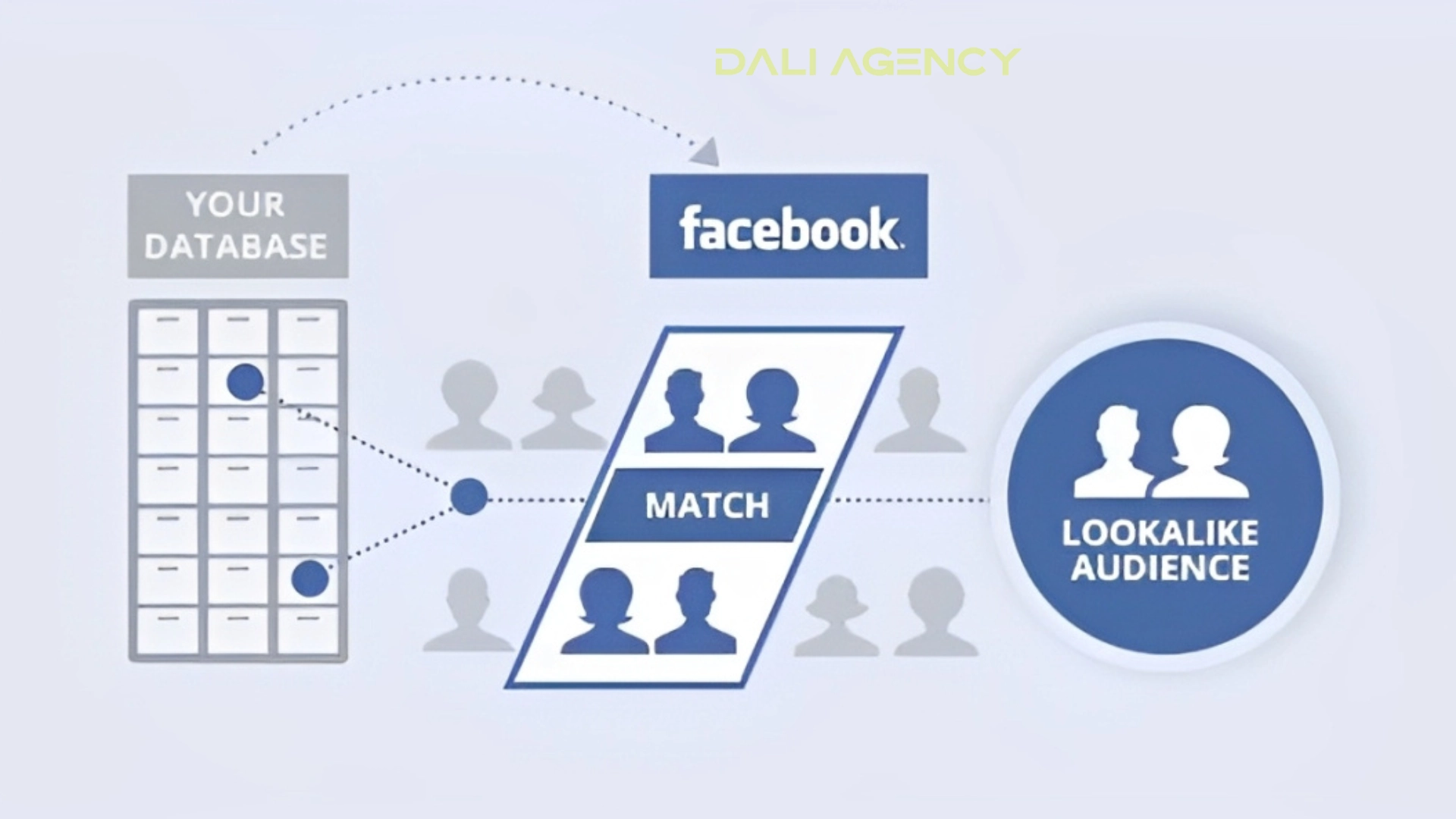
Additionally, the custom audience feature is useful in many cases. When you want to retarget people who have previously interacted with your brand, you can create a Lookalike Audience to target those similar to your typical customers.
For retargeting, it’s effective to use dynamic product ads (videos, shorts, animations). Dynamic Product Ads allow you to create templates, and then Facebook uses data to automatically display ads for the products. This is an effective strategy for product categories with around 20 items.
4. Choose your Facebook Ads placement
Ad placement refers to where your ads will appear for your target audience. Depending on your marketing goals, ads can be shown in various locations across Facebook, Instagram, Messenger, and the Audience Network.
At first, it’s recommended to use automatic placement. This allows Facebook to choose placements based on the selected audience and goals, making it a great option for beginners.
However, businesses can also opt for manual placement. This should only be done if you have experience or are working with a Facebook Ads expert.
Typical ad placements include:
-
Reach campaign
-
Stories and reels
-
Ads in feed posts
-
In-stream ads
-
Reels overlay
-
Apps and websites
-
Messages
-
Search results
5. Create ad copy and creative for Facebook Ads
Visually engaging ads always stand out and attract viewers, helping to drive user interaction. Businesses can create ads from an existing organic post, but they can also upload original ads and copy (this requires more time and resources).
First, decide on the ad format you want to use. This will depend on your business goals, the type of product you’re selling, and your creative capabilities. Here are some popular ad formats:
-
App ads
-
Story ads
-
Single image ads
-
Collection ads
-
Video ads
-
Carousel ads
-
Slideshow ads
-
Messenger ads
Once you’ve decided on the format, businesses can upload images and copy. However, ad copy space is limited, so it’s important to keep it concise and impactful.
Additionally, make sure the ads don’t disrupt the user experience for your target audience. They should be able to read and understand the message within a few seconds. When creating the message, make it brief and engaging.
6. Launch your Facebook Ads
Before publishing your ad, make sure to check the image size and the length of the copy. Once you click the “Publish” button, you will need to wait about 24 hours for Facebook to review and approve (or reject) the ad. Facebook must verify that the ad complies with community guidelines and ad specifications.
7. Conduct A/B testing and optimize your Facebook Ads
Running A/B tests and optimizing your ads over time is the best way to ensure you get ads that convert effectively. Creating the perfect ad right from the start is challenging, so it’s important to monitor and adjust regularly.
Ensure that your Facebook campaigns are integrated with your email list. A multichannel strategy is the best way to capture interest in your business and turn your target audience into paying customers.
Still struggling with creating your Facebook Ads campaign?
Starting a Facebook Ads campaign can be challenging at first. But businesses don’t have to do it alone. Dali Agency can help you execute all the steps smoothly and easily. Start with us to achieve your business goals! If you need more information or detailed consultation, feel free to reach out to us. We are always ready to support you!
